You can upgrade your DASH-PRO today and enjoy more features right on your screen.
The first step is to update the software that has received a new version 2.0.0, which is available on the download website www.injepro.com/downloads, after downloading and installing the new version, open the software and follow the firmware update steps.
For this:
1. Disconnect the DASH-PRO from the car harness:
2. Using the USB cable that comes with the DASH-PRO, connect the USB cable to your notebook or desktop, open the software and select the update mode.
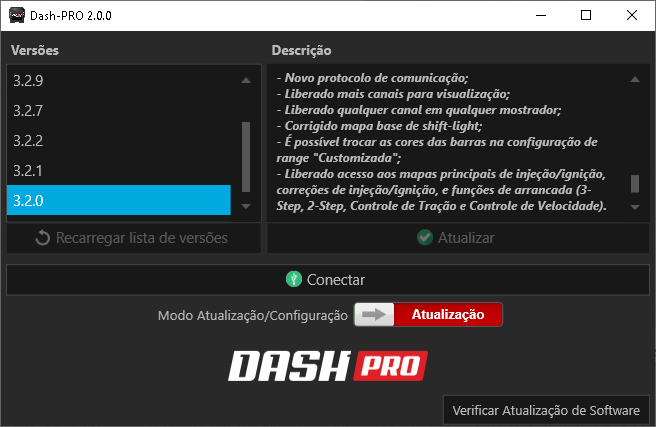
3. With the Dash Pro booting, indicated by the flashing blue LED, click connect and on the home screen search for version 3.3.0 and press the update button.
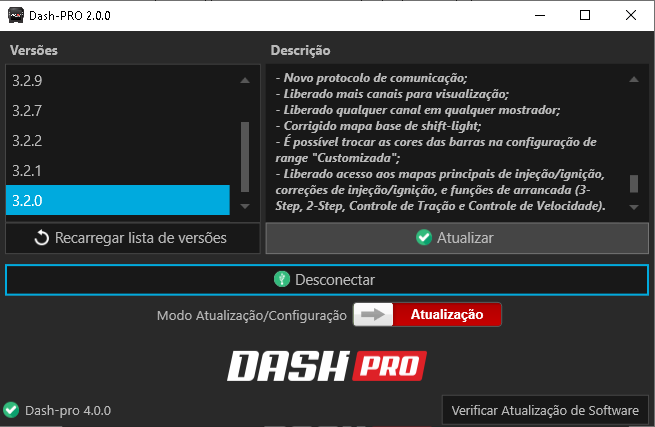
4. When you click update, an instruction and confirmation window will open. Read it carefully to avoid problems when updating.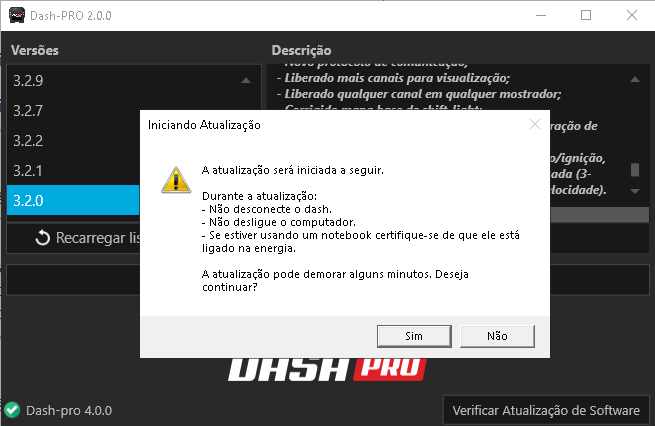
5. Click “Yes” if you want to confirm the update or “No” to cancel the procedure.
6. Wait for the update;
7. You can track the update progress on the software progress bar;
8. Wait for the reboot and that's it! Your display is updated.
If you do not have the updated software version, access our website www.injepro.com in the downloads section and follow the installation steps.
With the updated software and firmware, it is now possible to configure the Dash startup screen with an image of your choice.
With the display connected, open the software and activate the configuration mode. Click on “Load new image” and select the desired image. You can adjust the size that appears on the screen and delete an image that was already loaded.
Now let's talk about the added functions to configure your S8000 directly on the screen. Get access to ignition configuration, injection and other functions such as datalogger, traction control, booster and much more.
In addition to the configurable LEDs for alerts, you now have labels that appear on the Dash PRO screen identifying which alert is active,
We also added a complement for the shift light LEDs, which now have the function displayed on the screen, making this function more visible and helping you change gears at the perfect time.
And to assist contact between the customer and technical support, a CAN or flash memory hardware error message will be displayed when the Dash Pro fails to initialize, making it easier to identify possible installation problems.
Update your equipment and have the maximum options it can offer you. If you have any questions, please contact our Support team.
Telephone: +55 (45) 3037-4040
Email suporte@injepro.com
Whatsapp Technical Support: (45) 99834-0022